Showing posts with label windows software. Show all posts

Oct 6, 2013

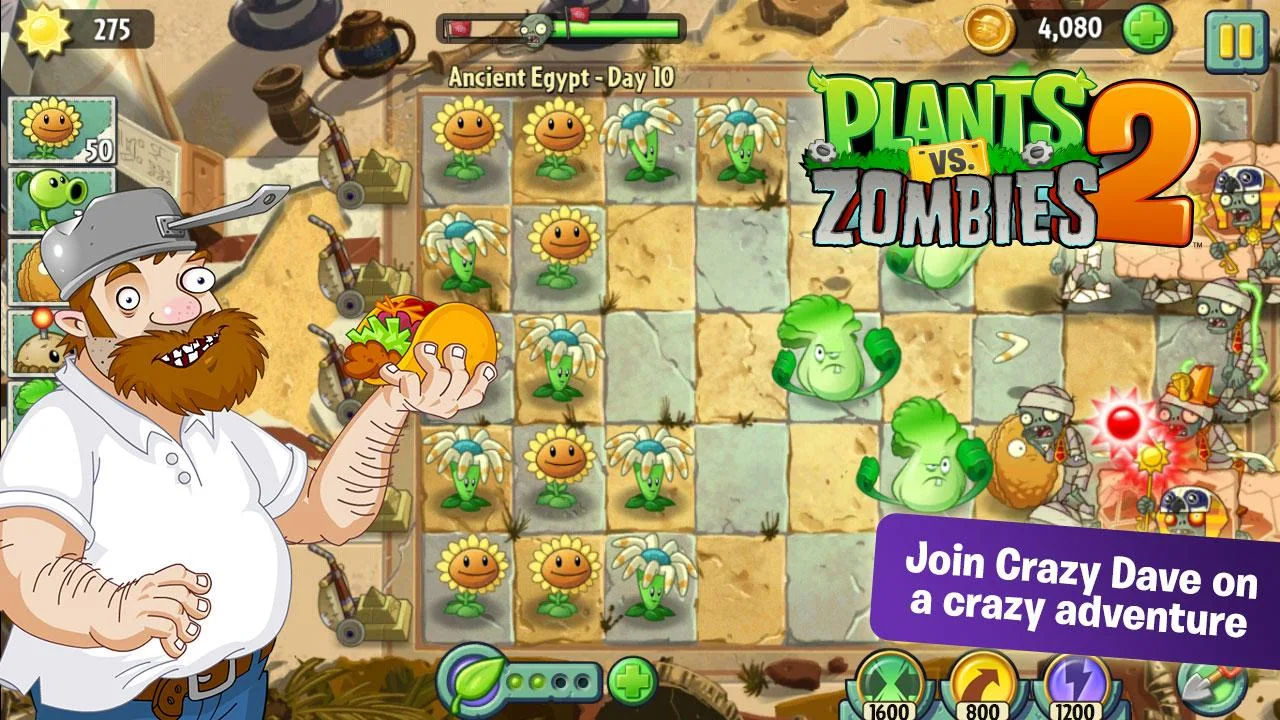
Plants vs. Zombies 2


Finally, Plants vs Zombies 2 reaches Google Play Store. Click the download button below to get it on your device now. Have fun!

Get it on Google Play

Oh wait! You want a PC version of the game? No problem. Thanks to coders, Team ALGO024, they develop and restructure the game to a complete PC version! Download PC version of PVZ2 at here.


Subscribe if you haven't already. 
And give me a +1 by clicking button below ☟

Sep 23, 2013

Free Cloud Storage

Just a few short years ago, cloud storage services that synced files and folders across multiple PCs and mobile devices were just a dream. But thanks to the rapid rise of entities like Dropbox, SugarSync, and Google Drive, cloud storage and syncing services are nearly ubiquitous today, acting as hard drives in the sky that help you do all kinds of things. With some patience, you can build your own supercloud with more than 200GB of free storage. With a lot of patience (and pestering of your pals), you can nab more than 400GB. And all that online storage is free-as-in-free-beer free.

Sep 12, 2013

Evernote 5 for Windows Desktop is Here


Previously, I was posting on Evernote 5 Beta.
And now, the Evernote 5 final release is here! Check on The Evernote Blog for the full new features.
Download link at below.

Evernote 5

Aug 30, 2013

Pomodoro Timer for the Windows 7 TaskBar

Pomodoro Timer is a pretty simple out-of-the-way timer which sits in the Windows 7 taskbar and is controlled from the Win7 JumpList, this one might be worth trying out.

Discover Android hardware and system info with CPU-Z

CPU-Z is one of those ageless, priceless apps that PC users covet so much it’s among the first thing they install. It tells you almost everything you need to know about the silicon powering your computer, including information on sensor temperatures, clock speeds and more. 

Aug 16, 2013

VirusTotal

VirusTotal

VirusTotal is a web-based system that scans any uploaded file with more than 40 different antivirus products. You can use VirusTotal to check your own computer.  The simplest way is just to head to www.virustotal.com in your web browser and upload any file you're concerned about.  However, there's also an official downloadable Windows utility that can do this for you automatically, and which has some extra capabilities that aren't available via the web site.

Aug 15, 2013

EagleGet - Free Alternative to Internet Download Manager (IDM)

EagleGet offers almost all the features of a paid download manager like IDM absolutely free of cost. The application has a really nice looking UI. It feels modern, classy and simple. One of best features in EagleGet is how it automatically organizes the download files into different categories, such as Media, Documents, Software and Compressed.


The application also has an integrated ad-free online video sniffer, which allows the app to automatically detect and save streaming videos for offline viewing.

EagleGet-video-sniffer

Regular downloads can be added both manually and automatically. The manual route involves copying and pasting the download link into the application by hitting the ‘Add Download’ button. You can then specify download location, category and output name.

The application also integrates itself into Internet Explorer, Google Chrome, and Mozilla Firefox so any download coming from these browsers is caught by EagleGet. Browser integration saves time by automating the process of adding downloads. That is, the application gets the ability to automatically grab download URLs from your browser.

Through the application’s options, you are able to specify a few useful things such as whether to scan each file downloaded using your antivirus. You can also enable a PC shutdown once all your files have been downloaded.


Check out EagleGet at here.

Jul 31, 2013

Cloudup: 200 GB of Free Cloud Storage

Cloudup

Cloudup gives users an ubiquitous file sharing platform for mobile and desktop, letting them store their videos, photos, music and documents, and share them with anyone as stream links. Each user can store up to 1000 files of up to 200 MB each for free, with premium accounts in the making to extend these limits. The service has applications available for both Windows and Mac OS X.

Jul 28, 2013

Fix & Remove Broken Shortcuts in Windows

Bad Shortcut Killer


Bad Shortcut Killer is a freeware that will scan your Windows start menu, jump lists and desktop and fix or delete them easily. To fix the broken shortcuts, run Bad Shortcut Killer. Click on the ‘Find Bad Shortcuts’ button and the tool will search for invalid shortcuts. Once the scan is completed, you will be presented with a list of broken shortcuts.

Select the shortcuts that you think are broken and click on the ‘Delete Selected Shortcuts’ button. The broken or invalid shortcuts will be deleted. This freeware can do the following:
1. It searches Start Menu, Desktop, Jump Lists & Startup Folder for broken shortcuts.
2. It can remove the invalid shortcuts
3. It keep your start menu & desktop tidy and free from broken shortcuts
4. Help keep invalid shortcuts off of your start menu and your desktop.

Download it at here.

Broken Shortcut Fixer


Broken Shortcut Fixer scans your Windows computer for broken shortcuts and automatically repairs any shortcuts that it can find using the Windows link resolve method. To use this broken shortcut remover:

1. Click “Scan Shortcuts” to repair and find broken shortcuts.
2. Double-click broken shortcuts to view them in Windows.
3. Hover over a broken shortcut to see the broken path.
4. “Delete Broken Shortcuts” will send the selected shortcuts to the Recycle Bin.

Download it at here.

Jul 23, 2013

Evernote 5 for Windows Desktop (Beta): Redesigned with over 100 New Features

The popular Evernote desktop client has just got better. Yes, Evernote has released the first beta version of its upcoming Evernote 5 desktop client for Windows operating system with plenty of new features and improvements. This major release for Windows comes almost eight months after Evernote Corporation released Evernote 5 client for Mac.

For those aren’t familiar with Evernote note, it’s a popular and probably the best note taking software out there. The cool thing about Evernote is that it’s available in both free and premium editions. The free version offers monthly upload up to a maximum of 60 MB where as you can upload up to 1 GB every month if you upgrade to premium account.

Jul 18, 2013

Antivirus Software Showdown


Do you know how effective your antivirus programs is? A variety of organizations regularly compare antivirus programs, throwing a large amount of malware samples at them, seeing how they perform, and ranking them in comparison to each other.

It would be very time-consuming to test 30 different antivirus programs in virtual machines with a large amount of malware samples yourself, which is why these test results are so useful. In the meantime, long written advertisement articles are avoided as the writer get paid to write some article about how wonderful they are.

Jul 10, 2013

How To Install Google Chrome Extensions In Opera Browser (and Vice Versa)

Add-ons and extensions are one of the most popular features a web-browser can have. The only drawback being that your choice of browser limits what extra features and functionality are available to you.

Safari’s extensions don’t work in Firefox; Firefox add-on’s don’t work in Internet Explorer; and Internet Explorer… does it even have any of its own?!

With the popular web-browser Opera switching to the same web rendering engine as Google Chrome, namely Blink, the uneven playing field is levelling out: Chrome extensions can now be installed on Opera, and Opera’s new add-ons work in Chrome.

Developers and users alike will benefit from this, and whilst not all features of Chrome work in Opera at present (or vice versa) most, if not all, Chrome Extensions should work without a hitch.

So let’s see how you go about it.

Jun 17, 2013

Dropbox Update: Quicker Sharing from the Desktop

Now when you want to share a link to any doc, photo, folder, or any of your stuff in Dropbox folder (desktop), just right-click it, and select “Share Dropbox Link”. A second later you’ll get a bubble telling you the link is in your clipboard. Just Control-v or Command-v to paste your link wherever you want, without having to visit the site or open a menu like you used to before.

Quick sharing on desktop

Dropbox Blog

May 25, 2013

Protect Your PC with IObit Malware Fighter 2

IObit Malware Fighter 2 adds a variety of features that update the software for modern times, including a Metro-style UI, cloud security and full Windows 8 support.

May 24, 2013

CupCloud: Resume Your Work Anywhere


CupCloud makes it easy to save and stop your work on one computer and pick right up where you left off on another, or save your session so you can reboot your computer and get right back to work without opening a ton of tabs or applications again.

May 19, 2013

MP3Jam: Search, Stream, and Download Music

MP3Jam is a simple but surprisingly capable free tool for locating and downloading anything from individual songs to entire albums. It works incredibly well. Search and download is extremely fast. Setup and settings are very simple. It found almost every bit of music I threw at it and displayed all with detailed information and album art. It is also free, and there is something to be said for that as well.

Start Menu Reviver: Touch-Friendly Start Menu For Windows 8


More than a dozen of free and paid Start menu programs are available for Windows 8. Most of the Start menu programs out there for Windows 8 sport the same Windows 7-style interface. The problem with those Windows 7 Start menu-style programs is that they aren’t designed for touch screen.

Users who own a Windows 8-powered tablet and looking for a touch-friendly Start menu for Windows 8 should try out the newly released Start Menu Reviver program.

May 18, 2013

Viber Messaging App Now Extends to Desktop


Popular messaging app Viber, which already boasts 200 million users, now has you covered on your PC and Mac desktop computers as well as your smartphones and tablets.

The app, which allows users to send free instant messages and telephone calls, is one of a leading group of services such as Skype, Whats App and Google Voice, which are challenging the business models of mobile carriers and other telecommunications companies with their low-cost and no-cost services.